


Lagom: Fast VPN Proxy
4.2497.00 Reviews
App Specs
- Version
- Varies with Device
- Updated On
- License
- Free
- Downloads
- 10,000,000+
- Developer
- Lagom Products
- Categories
- Tools
- Platform
- Android
Screenshots
 Analysis by AppCompare
When I choose a VPN, I care less about impressive-sounding promises than about whether it fits into an ordinary day: connecting without a fuss, staying usable for the task at hand, and not making every app feel sluggish. LagomVPN: VPN Proxy is a tools app from Lagom Products built around V2Ray and VLESS connections. Its focus makes it more interesting to people who already have a reason to use those protocols than to someone who simply wants the most familiar one-tap VPN experience.
What its speed claims mean in practice
The app is presented as offering unlimited speed, but I would treat that as a description of the service’s aim, not a guarantee that every connection will feel equally fast. VPN performance depends on the route, the server you choose, your local network, and what you are doing. A nearby connection may be a better starting point for everyday browsing, while a distant location chosen to reach a particular service can add delay even when the VPN itself is working normally.
That distinction matters most for video calls, online games, and large downloads. For reading, messaging, and checking a few pages, a little extra latency may go unnoticed; for a live call, it can be more apparent. If a page feels slow, I would first compare another available server and then briefly check the same task without the VPN. That simple comparison helps separate a busy route from a weak Wi-Fi signal or a problem with the site itself.
Choosing a connection for heavier use
V2Ray and VLESS support will appeal to users who want protocol options rather than a VPN that hides every technical choice behind a single button. The trade-off is that extra choice can make setup and troubleshooting less obvious to a first-time user. I would avoid changing several connection settings at once: make one adjustment, test the same app or page, and keep track of the configuration that worked. This makes it much easier to undo a change if access becomes less stable.
For a long streaming session, I would choose a server with a practical route to the service instead of repeatedly chasing a location that sounds ideal. A VPN can help with network privacy, but it does not make a streaming service’s own regional rules disappear, and a platform may still limit access. If video quality drops, try a different connection before assuming that the app or the service is broken. For a large file transfer, I would also avoid switching servers halfway through unless the connection has clearly stalled, since a changed route can interrupt active work.
Stability and getting back online
Stable access is part of the app’s appeal, but no VPN can remove every cause of a dropped connection. Moving between Wi-Fi and mobile data, entering a weak-signal area, or dealing with a congested network can all affect a tunnel. If access stops, my first practical steps would be to check the phone’s connection, reconnect in the app, and try another server if the original route remains unresponsive. Repeatedly tapping connect without checking the underlying network is unlikely to help.
Split tunneling is a useful idea when only some traffic needs to use the VPN. For instance, you may want a browser to use the protected route while keeping a local banking or home-network app on the regular connection. The useful detail is not just that split tunneling exists, but that it calls for deliberate choices: if you exclude an app, its traffic will not take the VPN route. I would review those selections after changing how I use the phone, rather than assume every app is covered automatically.
Worth Reading Before You Choose

EA SPORTS FC Mobile 26 Is a Bigger Football Game, but It Takes Time

Flipboard Shows What News Apps Must Do Beyond the Feed

Switching to Android Auto Means Rethinking Your Driving Routine

Google Calendar Makes a Crowded Week Easier to Manage

Ludo King Makes the Most of the Minutes Between Plans

Baby Panda World Brings Quick Play to Modern Phones, but Its Game Library Feels Busy
Who will appreciate it—and who may prefer another option
I see the strongest fit for someone who specifically wants V2Ray or VLESS, needs split tunneling, or is comfortable comparing connection choices when a route behaves differently. Someone looking for a simple app to protect occasional browsing may find a conventional VPN with fewer protocol decisions easier to understand. And if your main requirement is dependable access to a particular work system, I would use the setup approved by that employer instead of choosing a personal VPN on convenience alone.
It is also worth separating privacy tools from total anonymity. A VPN changes how traffic is routed, but it does not make accounts, browser activity, or information voluntarily entered into a website anonymous. I would still use sensible account security and avoid treating a VPN as a substitute for careful browsing. That is especially important when connecting to public Wi-Fi: the VPN can be one part of a safer routine, not a reason to ignore what a page is asking you to do.
Cost, age suitability, and device fit
LagomVPN is free to install and is marked for everyone, so trying the basic app does not require an upfront purchase. Optional in-app purchases range from $2.49 to $21.99 per item. I would check what a purchase changes before paying and decide based on a real need, rather than assume that paying automatically improves speed or fixes a route. Its 4.6 average from around 70,000 ratings and more than 5 million installs suggest broad adoption, though popularity alone cannot tell you whether a particular server or setup will suit your connection.
The stated minimum operating-system requirement is Android 8.0. On an older or lower-powered phone, I would leave room for ordinary system limits: running any VPN adds network handling, and background restrictions can affect how an app behaves when you switch away from it. If a connection seems to stop after the screen has been off, check the phone’s battery and background-app settings before concluding that the server is at fault. Those controls vary by device, so a setting that helps on one phone may not be named the same way on another.
In a realistic routine, I might connect before opening a browser on café Wi-Fi, keep only the apps that need the tunnel in its split-tunneling setup, and then disconnect when I return to a trusted home network if I no longer need it. That avoids treating the VPN as a set-and-forget answer to every network situation. It also gives me a clear way to notice whether a particular route is causing a slowdown: compare the same task with the connection on and off, while keeping the network and app unchanged.
Lagom Products has placed this app in the tools category, and the central decision is whether its protocol support and routing control are useful to you. If you want a very hands-off VPN, or expect every distant connection to behave like a nearby one, a simpler alternative may be a better match. If you value the ability to work with V2Ray or VLESS and can spend a little time testing routes, it is more compelling. I would judge it by the connection that matters to my own routine, not by a broad promise of speed.
Have you ever found yourself stuck trying to access content online, only to be met with the dreaded "This site is not available in your country" message? It’s a total buzzkill, right? Well, let me introduce you to LagomVPN: VPN Proxy, a nifty app that might just be the answer to your geo-restriction woes. I took it for a spin, and here’s what I found.
First Impressions and Installation
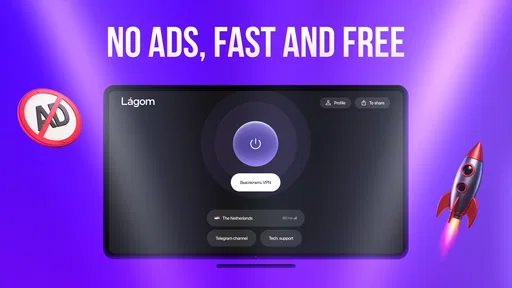
Getting started with LagomVPN: VPN Proxy was a breeze. I found it on the app store, hit download, and it installed without a hitch. The moment you open the app, you're greeted with a clean and intuitive interface. Seriously, it’s the kind of app that doesn’t require a tutorial to figure out. Everything is laid out logically, and you can tell that usability was a top priority for the developers.
Features That Stand Out
Once you're in, you’ll notice a bunch of features that make LagomVPN stand out. First off, the app offers a vast array of servers from all over the world. Whether you want to stream a show from the UK, browse securely from a server in Japan, or access an exclusive site in the US, LagomVPN has you covered. The connection is super simple; just tap on the country you want, and voila! You're virtually there.
Another cool feature is the app’s commitment to privacy. It promises a strict no-logs policy, which means your online activities are not tracked or recorded. In a world where data privacy is a major concern, this is a huge plus. Plus, there’s a built-in ad blocker, which is a lifesaver for those of us who are tired of pop-ups every time we visit a new site.
Performance and Speed
Now, let’s talk about speed because nobody wants a VPN that turns their browsing experience into a snail race. I tested LagomVPN on various servers, and I have to say, I was impressed. The speeds were consistent, and streaming quality was top-notch. I binged a couple of shows without a single buffering incident, which is a testament to the app’s reliable performance. It’s comforting to know that you don’t have to sacrifice speed for security.
Ease of Use
One of the things I really appreciated was how user-friendly LagomVPN is. Switching between servers is a cinch, and the app doesn’t bombard you with unnecessary features. It’s straightforward, which makes it perfect for VPN newbies and seasoned users alike. Even if you’ve never used a VPN before, you’ll feel like a pro navigating through this app.
Security Features
Security is a big deal when it comes to VPNs, and LagomVPN doesn’t disappoint. It uses high-level encryption to protect your data, ensuring that your online activities remain private. Whether you’re connecting to public Wi-Fi at a café or browsing from your home, you can trust that LagomVPN has your back.
The app also includes a kill switch feature. This means that if your VPN connection drops unexpectedly, the app will automatically disconnect you from the internet to keep your data safe. It’s like having an extra layer of security wrapped around your online presence.
Final Thoughts
After spending some quality time with LagomVPN: VPN Proxy, I can confidently say it’s worth checking out. It’s got a winning combination of speed, security, and simplicity. Whether you’re looking to bypass geo-restrictions, enhance your online security, or just enjoy a smoother browsing experience, LagomVPN delivers on all fronts.
If you’re on the hunt for a reliable VPN that won’t break the bank, give LagomVPN a try. It’s user-friendly, packed with features, and most importantly, it works. So go ahead, unlock the web, and enjoy surfing without borders. You can thank me later!
Pros
- Easy to use interface with quick setup.
- Stable connection with minimal drops.
- Unlimited bandwidth for all users.
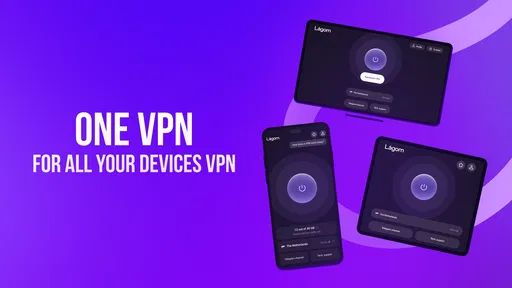
- Supports multiple devices simultaneously.
- No logging of user data
- ensuring privacy.
Cons
- Limited server locations available.
- No free trial option for testing.
- Customer support is email-only.
- Speed may vary depending on server load.
- Ads present in the free version.
FAQs for Lagom: Fast VPN Proxy
What platforms is LagomVPN: VPN Proxy available on?
LagomVPN: VPN Proxy is available for both Android and iOS devices. Users can download the app from the Google Play Store for Android or the Apple App Store for iOS. The app is designed to be user-friendly on both platforms, ensuring a seamless experience regardless of your device.
Does LagomVPN: VPN Proxy keep logs of user activity?
LagomVPN: VPN Proxy prioritizes user privacy and security. It adheres to a strict no-logs policy, meaning it does not track or store any user activity or connection logs. This ensures that your browsing history remains completely private and secure while using the VPN service.
How does LagomVPN: VPN Proxy enhance online security?
LagomVPN: VPN Proxy enhances online security by encrypting your internet connection, making it difficult for hackers and third parties to intercept your data. It uses advanced encryption standards to protect sensitive information, ensuring safe browsing, especially on public Wi-Fi networks.
Can I access geo-restricted content with LagomVPN: VPN Proxy?
Yes, LagomVPN: VPN Proxy allows you to access geo-restricted content by masking your IP address. By connecting to servers in different countries, you can bypass regional restrictions and enjoy content from streaming services, websites, and apps that might be unavailable in your location.
Is there a free version of LagomVPN: VPN Proxy available?
LagomVPN: VPN Proxy offers a free version with basic features, allowing users to test the service before committing to a subscription. However, for enhanced features, faster speeds, and more server options, a premium subscription is recommended. This ensures a comprehensive and unrestricted VPN experience.


